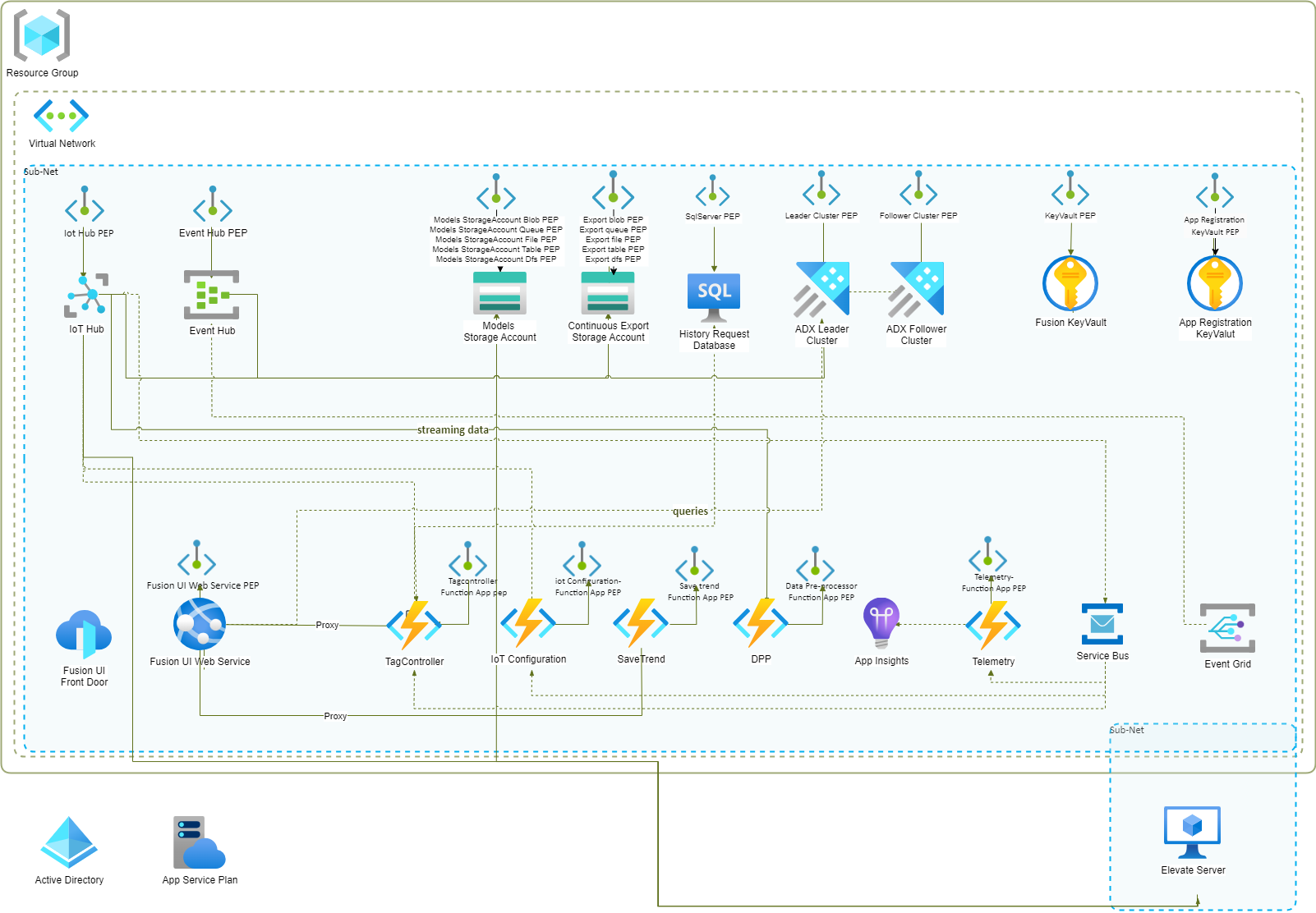
Fusion Private Endpoints Setup
Private Endpoints provide a mechanism for our customers to ensure that all data access to their Azure services is secure and isolated from the public internet. This can be especially important for highly sensitive tag/process data.
Note: Private endpoints are not enabled by default for Service Bus resources. This means that Service Bus is excluded from the list of resources for which private endpoints are configured as a default setting in Terraform. Private endpoint support for Service Bus requires the premium version of the Service Bus resource.
Additionally, to enable private endpoints for the Front Door resource, customers need to invest in the premium version of Front Door and manually set up the private links. This can be cost-prohibitive. As a recommended alternative, customers can exclude Front Door from their deployment and configure the Fusion UI App Service resource to handle internal proxying of calls to the function apps, Azure Data Explorer (ADX), and Microsoft Graph (MSGraph).
Instructions
Prerequisites:
- Main Application Deployment:
- Ensure that the main Fusion resources are successfully deployed to an Azure Resource Group.
Azure Private DNS:
- Verify Azure Private DNS Resources:
- Confirm that Azure Private DNS resources exist for the default supported resources that support private endpoints. If the resources already exist, skip to the Deploy Azure Private Endpoints section.
- Deployment Steps:
- Retrieve the latest build for deploying Private DNS resources from the "Fusion Private DNS" folder within the "Fusion Terraform" directory.
- Customize the variables in the "terraform.tfvars" file within the deployment directory as per your specific requirements. Details about each setting is provided in the file.
- Open PowerShell.
- Authenticate to Azure by running the
az logincommand. - Run
terraform initto initialize the Terraform environment. - To prevent unintended resource changes, execute
terraform planand carefully review the execution plan. - Finally, apply the configuration to create the Azure resources by running
terraform apply.
Deploy Azure Private Endpoints:
- Retrieve Deployment Build:
- Obtain the latest build for deploying Private Endpoints from the "Fusion Private Endpoints" folder in the "Fusion Terraform" directory.
- Customize the variables in the "terraform.tfvars" file within the deployment directory as per your specific requirements. Details about each setting is provided in the file.
- Open PowerShell.
- Authenticate to Azure by running the
az logincommand. - Run
terraform initto initialize the Terraform environment. - To prevent unintended resource changes, execute
terraform planand carefully review the execution plan. - Finally, apply the configuration to create the Azure resources by running
terraform apply.
Post-Deployment Tasks:
- Authentication and Authorization:
- After deploying Private Endpoints, ensure that authentication and authorization mechanisms within all services, including Azure SQL Database, Azure WebApps, ADX, and IoT Hub, are correctly configured to allow access via Private Endpoints.
- Create VNET Links:
- Set up VNET links for all Azure DNS resources as needed.
Validation and Monitoring:
- Private Endpoint Functionality:
- Validate the functionality of Private Endpoints by attempting to access Azure services privately from a virtual machine or client within the same Virtual Network where the Private Endpoints are deployed.
- Performance and Security:
- Monitor the performance and security of Private Endpoints and Azure resources. Set up logging and diagnostics as required to ensure effective management and troubleshooting.
Network diagram for the Private Endpoints